


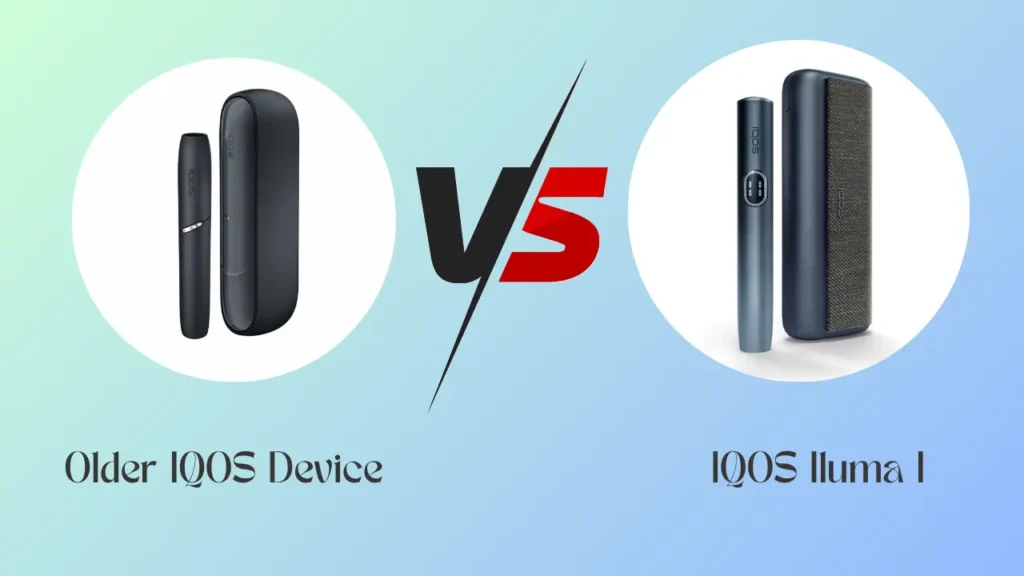
he IQOS ILUMA i is not a heating overhaul. It keeps the Smartcore Induction System already used in the original ILUMA and adds three items on top: a Touch Screen, a Pause Mode and FlexPuff. If you already own an ILUMA device, these three additions are the whole story of what changed. If you’re coming from an IQOS 3 DUO, the differences run deeper, starting with how the tobacco is heated in the first place.
What This Guide Covers
This guide compares ILUMA i against ILUMA and IQOS 3 DUO on paper, explains what Pause Mode and FlexPuff actually do, confirms what carries over unchanged, and gives a straight answer on whether upgrading makes sense wherever you are in Dubai, Abu Dhabi, Sharjah or Ajman.
Three Generations Compared at a Glance
Here’s how the three generations line up on the features that actually change daily use, including which stick format each one takes, whether that’s TEREA Kazakhstan or another regional line.
| Feature | IQOS 3 DUO | IQOS ILUMA | IQOS ILUMA i |
|---|---|---|---|
| Heating method | Ceramic blade | Smartcore Induction System | Smartcore Induction System |
| Compatible stick | HEETS | TEREA | TEREA |
| Cleaning required | Yes, regular blade cleaning | No | No |
| Interface | LED lights | LED lights and haptics | Touch Screen |
| Pause and resume mid-session | No | No | Yes, Pause Mode |
| Extra puffs per stick | Standard | Standard | FlexPuff adds more |
| Back-to-back sessions before recharge | Two | Two | Three |
Pause Mode Stops a Session Without Wasting the Stick
Pause Mode is one of two headline software features unique to the ILUMA i. It lets you stop heating mid-session, for example if you get called away or want to slow down, and pick the same stick back up later instead of the session running out unused.
Neither the original ILUMA nor the IQOS 3 DUO offers this. On those devices, once a session starts, it runs on a fixed timer regardless of whether you’re actively drawing on it. Pause Mode puts you in control of the pace instead.
FlexPuff Adds More Draws Per TEREA Stick
How FlexPuff Extends a Session
FlexPuff is the second addition, working alongside Pause Mode rather than replacing it. It extends the number of puffs available per stick beyond the standard session length, giving heavier users a bit more from each TEREA stick before it finishes.
This matters most if you found the standard session length too short on the original ILUMA. Combined with Pause Mode, FlexPuff lets a single stick stretch across a longer, more flexible session than earlier generations allowed.
Touch Screen Replaces LED Lights and Haptic Cues
Interface Jump from IQOS 3 DUO
The third ILUMA i addition is the Touch Screen. Instead of reading LED colors and counting vibration patterns to understand battery level, heating status and session progress, you get a direct on-device display you can glance at and interact with.
The original ILUMA and ILUMA i both use Smart Gestures and haptic feedback, so vibration cues for session start and end exist on both, including on a device like the IQOS ILUMA ONE. IQOS 3 devices used LED indicators only, with no haptic layer at all, so the interface jump from IQOS 3 DUO to ILUMA i is the largest of the three generations.
If an error signal is ever part of what you’re seeing on screen, this guide explains what each one means:
Understanding Common IQOS Iluma LED Light Errors and What Each Signal Means
Smartcore Induction and TEREA Compatibility Carry Over
It’s worth being clear about what didn’t change, because plenty of buyers assume the ILUMA i is a full redesign when it isn’t. The core heating technology, stick compatibility and several usability features carry over directly from the original ILUMA.
- Smartcore Induction System remains the heating method, no blade in either device, and no residue builds up to require cleaning
- TEREA sticks are still the only compatible stick, HEETS remain incompatible with any ILUMA device
- Autostart/Autostop still detects stick insertion and starts heating automatically
- Back-to-back sessions without recharging the holder carry over from IQOS 3 DUO through ILUMA i
- Multiple colors, finishes and swappable accessories such as ring caps, holder wraps and door covers remain available
Should Current ILUMA Owners Upgrade
If you already own an original ILUMA, the decision comes down to whether Touch Screen, Pause Mode and FlexPuff are worth it, because everything else stays identical. Heating, stick compatibility, cleaning requirements and accessory options don’t change.
Consider upgrading if you regularly get interrupted mid-session and want to resume rather than waste a stick, or if you’re a heavier user who wants more draws per TEREA stick through FlexPuff. If you’re satisfied with LED and haptic cues and don’t need to pause sessions, the original ILUMA still delivers the same core experience. Anyone still deciding between the two generations can read this guide for a side-by-side look at the standard formats:
IQOS ILUMA Standard vs Iluma I Standard: Which One Should You Buy in UAE
Should IQOS 3 DUO Owners Upgrade
Leaving the Blade and HEETS Behind
For IQOS 3 DUO owners, this is a bigger decision than a simple feature add-on, because moving to the ILUMA i means leaving the blade system and HEETS sticks behind entirely. Existing HEETS stock will not work with the ILUMA i or any ILUMA device, since the induction system only heats sticks built with the metal layer found in TEREA.
What you gain in return is the elimination of blade cleaning and blade breakage risk, plus the interface and session flexibility of Touch Screen, Pause Mode and FlexPuff on top. If you’re already tired of cleaning routines or have dealt with a broken blade, this is where the upgrade case is strongest.
Compact vs Familiar Format
The IQOS ILUMA I ONE offers this induction system in a single compact unit, while IQOS Iluma I Standard keeps the separate holder and charger format familiar to IQOS 3 DUO owners. Browse the IQOS ILUMA I ONE category if a pocket-sized single unit suits your routine better than a two-piece kit.
Multiple Finishes and Accehttps://podshub.ae/common-iqos-iluma-led-light-errors-and-solution/ssory Sets Across the Lineup
ILUMA i additions apply across the current lineup rather than one single finish. IQOS ILUMA I ONE comes in Lime Green, Orange, Black and Violet.
IQOS Iluma I Standard is available in Black, Violet and Blue, with an Orange (Vivid Terracotta) finish also part of that same standard format. A separate line, the Iqos Iluma Prime Kit, pairs the same induction technology with different accessory sets, including ring caps, holder wraps and door covers, in finishes such as Garnet Red on the IQOS ILUMA I Prime Garnet Red and Aspen Green on the IQOS ILUMA I Prime Aspen Green.
Choosing between these comes down to grip, size and finish preference rather than heating performance, since all of them run on the same Smartcore Induction System and accept the same TEREA sticks. Anyone weighing the IQOS ILUMA I Prime line against the standard range can compare the IQOS ILUMA I Prime category alongside IQOS ILUMA Standard to see finishes side by side, and Accessories covers the ring caps, wraps and door covers that fit either format.
Stick Compatibility Stays Consistent After Switching
Whichever ILUMA i device you choose, stick compatibility stays the same across the TEREA lineup, since every TEREA stick is built for induction heating. This is different from the IQOS 3 DUO era, where HEETS variants were the only option and none of them will heat correctly in an ILUMA i.
If you’re moving over from HEETS, treating the switch as a fresh flavor search rather than trying to match an old blend exactly makes more sense, since induction heating changes how the tobacco tastes regardless of the stick. TEREA Kazakhstan sticks such as IQOS TEREA Tidal Pearl Kazakhstan and IQOS TEREA Sun Pearl Kazakhstan sit alongside TEREA Japan options like IQOS TEREA Shine Pearl Japan, while TEREA Indonesian covers editions such as IQOS TEREA Emerald Edition Indonesian for anyone who prefers a bolder profile. TEREA SWISS is a further series worth comparing if you want a different flavor family entirely.
Read more on getting started with a first stick in this guide:
A Practical Next Step
Start with what you actually want fixed or added: interface clarity, session flexibility, or simply an end to blade cleaning. If you’re moving over from an IQOS 3 DUO, plan around TEREA compatibility rather than HEETS stock. For a deeper look at how induction heating actually works with TEREA sticks, the article How Smartcore Technology Works With Terea Sticks in IQOS ILUMA covers the mechanics in more detail. Browse the full ILUMA and TEREA range through Pods Hub.
This product contains nicotine, an addictive chemical. Not for sale to minors. Intended for use by adult smokers only.
Frequently Asked Questions
What is the main difference between IQOS ILUMA and ILUMA i?
ILUMA i adds a Touch Screen, Pause Mode and FlexPuff. Heating, stick compatibility and cleaning stay identical.
Does the IQOS ILUMA i use the same sticks as the original ILUMA?
Yes, both use TEREA sticks only. HEETS remains incompatible with either device.
Is the IQOS ILUMA i worth upgrading from the original ILUMA?
Only if Touch Screen, Pause Mode or FlexPuff matter to you, since everything else is unchanged.
What is the difference between IQOS ILUMA I One and IQOS ILUMA I Prime?
I One is the compact single-unit format; I Prime is a separate kit line with its own finishes and accessories. Both run the same induction system and TEREA compatibility, so it comes down to size and finish.
Does switching from a heating blade to induction heating change how sessions feel day to day?
Yes, no blade means nothing to clean and no breakage risk. That change is biggest moving from IQOS 3 DUO, not between ILUMA generations.